By Rowan Ellis · Updated October 7, 2026
Zapier alternatives for SaaS teams that have outgrown per-task billing
The Zapier alternatives most worth testing for a SaaS team are n8n, Make, Activepieces and Pipedream, with Workato as the option when governance and procurement drive the decision. The usual reason to leave is the meter: Zapier counts a task for every action step that succeeds, so a workflow that grows from two steps to eight costs four times as much per run without anyone doing more work. A second pull is control, meaning self-hosting, SSO and who owns the workflows when an employee leaves. Prices below were read from each vendor's pricing page on October 7, 2026.
Zapier's own page frames the product around AI orchestration (Zaps, Tables, Forms and an MCP layer), and it still advertises more than 9,000 app integrations. That breadth is the thing most people miss after they move. What follows is why the bill climbs, what the same workflow costs elsewhere at three volumes, where each alternative is weaker, and what Zapier's help center says you can and cannot carry out of the account.
Where Zapier bills start to hurt
Every action is a task. Zapier's pricing page says tasks are used when a Zap successfully moves data or completes an action, and that triggers don't count toward the limit. So a Zap with one trigger and five actions spends five tasks each time it runs. Add a filter-then-lookup-then-update chain to an existing Zap and your monthly usage rises by that many tasks per run, even though nothing about the business changed.
Past your allowance, the rate is worse. The same page states that pay-per-task billing is charged at a higher per-task rate than your base subscription tasks. It also says a higher task tier lowers the cost per task, so the cheap way to avoid overage is to buy a bigger bucket up front, which means paying for headroom you may not use.
The free plan is small and shallow. Free is $0 with 100 tasks a month and two-step Zaps only. Anything with a branch, a lookup and a write needs Professional, which the page lists from $19.99 a month at its entry task tier along with multi-step Zaps, webhooks and unlimited premium apps. A 14-day Professional trial with no card is offered, but Zapier's import article says import is unavailable during that trial.
Team controls sit on a different price floor. Team is "starting from $69" a month and lists 25 users, shared Zaps and folders, shared app connections, SAML SSO and priority support. If the reason you want shared connections is that three people each built a Zap on a personal login, you are buying the plan for governance rather than for volume. Enterprise (quote-based) adds unlimited users, advanced admin permissions, annual task limits and observability.
The way out is gated too. Zapier's help article on importing and exporting Zap workflows marks the feature as available on Team and Enterprise, with Free and Professional showing a cross. People on lower plans can still leave, but they cannot take a single JSON of everything (more on that in the moving section).
The pricing page as captured in October 2026
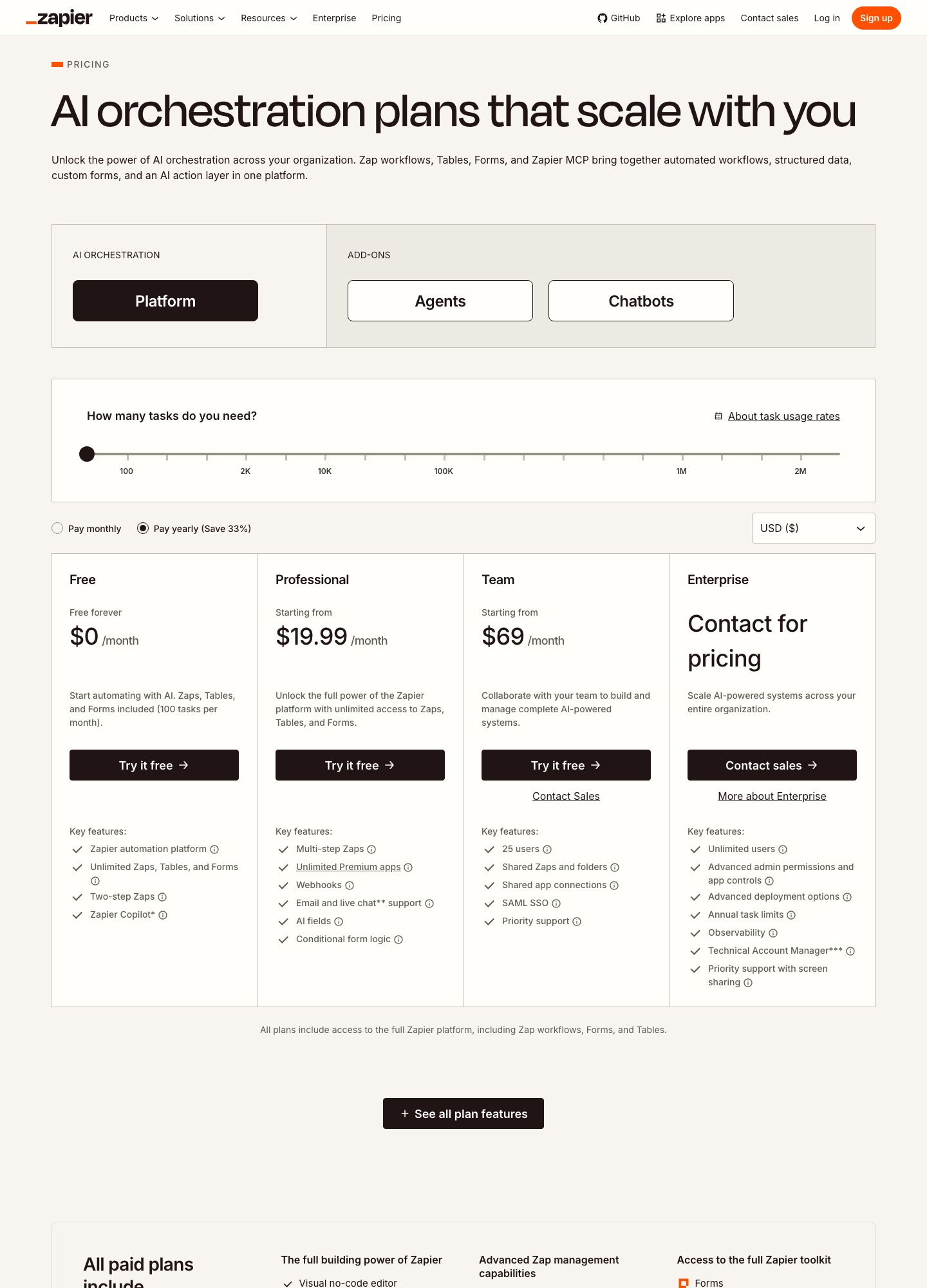
The capture has the "Pay yearly (Save 33%)" option selected and the task slider on its first stop, with labelled stops at 100, 2K, 10K, 100K, 1M and 2M. That is why only entry prices appear: $0, "starting from" $19.99, "starting from" $69 and a contact-sales Enterprise card. Dollar amounts at the higher slider stops sit behind the slider, so this page does not quote them.
Five alternatives and the reason each one exists
| Alternative | Meter and published price | Where it fits | What you give up |
|---|---|---|---|
| n8n | Whole-workflow executions, steps unlimited. Starter $20/mo for 2.5K executions, Pro $50 for 10K, Business $800 for 40K, all billed annually. | Workflows with many steps, and teams comfortable running or at least reading code and JSON. | Business is self-hosted only; SSO, LDAP, Git and multiple environments start there. |
| Make | Credits, one per module action. For 10k credits: Core $9, Pro $16, Teams $29 a month billed annually ($10.59, $18.82, $34.12 billed monthly). | Visual builders who want branching and routing on a canvas at a low entry price. | Scenarios stop when credits run out; credits expire at the end of the term. |
| Pipedream | Usage credits, 1 per 30 seconds of compute. Startup $99/mo billed annually or $150 billed monthly, with 10,000 credits and then $0.012 each. | Developers who would rather write code steps than click through a builder. | Free is development-only; production needs Startup. No SSO or SCIM below Business. |
| Activepieces | Credits. Free 1,000 a month; Plus $20 for 10,000; Team $200 for 50,000; $0.007 per extra credit on both paid plans. | Teams who want cloud or on-prem hosting on every plan and a flat monthly number. | Audit logs, SCIM and Git sync wait for the sales-led Ultimate plan. |
| Workato | Quote-based; four editions, with task consumption tracked in a usage dashboard. | Companies that need dev/test/production environments and role-based access from the first edition. | No price to evaluate in advance, and contract terms vary by when you joined. |
One workflow, three volumes
Take a workflow with one trigger and five actions (say, a new paid signup that enriches the contact, creates a CRM record, posts in Slack, opens an onboarding task and logs a row). Zapier meters the five actions, so each run is 5 tasks. Here are 400, 2,000 and 20,000 runs a month.
- 400 runs: 400 x 5 = 2,000 Zapier tasks. That is 20 times the Free plan's 100 tasks, so Professional is needed, from $19.99 at its entry tier (we cannot say whether the 2K slider stop costs more). n8n counts 400 executions, which sit inside Starter's 2.5K at $20 a month billed annually. On Make, 2,000 credits is more than Free's 1,000, so the 10k-credit Core card at $9 annual or $10.59 monthly applies.
- 2,000 runs: 2,000 x 5 = 10,000 Zapier tasks. n8n still counts 2,000 executions, which fit Starter's 2.5K ($20). Make's 10,000 credits fills the 10k card to the brim, at $9 to $29 a month billed annually depending on plan, with nothing left for a retry-heavy week. Activepieces' Plus plan has 10,000 credits for $20, but the pricing page we read does not say how many credits one step consumes, so we leave it at the plan figures.
- 20,000 runs: 20,000 x 5 = 100,000 Zapier tasks, one of the labelled slider stops, though the price is not in the capture. n8n counts 20,000 executions, which is past Pro's 10K, so the next published tier is Business at $800 a month billed annually, self-hosted only (the Pro and Business cards carry a selector for other execution counts that we did not read). Make's slider lists 80k and 150k but no 100k, so a 100,000-credit figure is not something we can quote.
Two overage sums are worth doing because the vendors publish the rate. Activepieces Plus at 25,000 credits is $20 + (15,000 x $0.007) = $20 + $105 = $125, and Plus passes the $200 Team price at about 35,700 credits ($180 / $0.007 is roughly 25,700 over the 10,000 included). Pipedream Startup at 25,000 credits is $99 + (15,000 x $0.012) = $99 + $180 = $279 billed annually, or $330 billed monthly.
Choosing among them, and what you trade away
n8n if steps are what hurt
n8n's pricing page says an execution is a single run of the entire workflow, and that step count and data volume do not matter. That turns the five-action example above into 2,000 billable units rather than 10,000, and a ten-action workflow costs the same as a two-action one. The page also says every plan includes unlimited users and workflows, and a self-hosted Community Edition is on GitHub. The costs are operational: Starter allows 5 concurrent executions and forum support, and the jump from Pro ($50) to Business ($800) is where SSO and LDAP, multiple environments, queue mode and Git version control appear. Our n8n vs Zapier page goes deeper on that comparison.
Make for visual routing at a low entry price
Make's page counts each module action as one credit and does not count error-handler modules. For a 10,000-credit month the Core and Pro cards ($9 and $16 a month billed annually) sit below Zapier's $19.99 entry for Professional, while Teams at $29 sits above it, and the units are not identical. Make's Free plan has a 15-minute minimum interval, 2 active scenarios and 7 days of execution logs; Core and above remove the scenario cap and allow minute-level scheduling. The catch is that scenarios stop when credits run out until you add more, and the page says unused credits expire at the end of the term. See Zapier vs Make for a feature-level read.
Pipedream when your team writes code
Pipedream's page lists 3,000+ connectors, 10,000+ prebuilt tools and triggers, managed auth for APIs and MCP servers, and unlimited team members on Free, but "every feature, in development" means the free plan cannot run production workloads. Startup adds production, 100 external users and email support, and Business adds SSO, SCIM, HIPAA, static egress IPs and SLAs. Because a usage credit is 1 per 30 seconds of compute, a short action and a long one are priced differently, which is fairer for light steps and harder to forecast for heavy ones.
Activepieces for on-prem and a flat plan price
Activepieces lists cloud or on-prem on all four plans, and Free gives 1,000 credits a month, unlimited flows and up to 5 users. On Free, credits reset daily and going over means waiting until tomorrow; on Plus and Team you pay $0.007 a credit instead. Team ($200) adds 25 users, SSO and standard roles, global connections and email support. The gap is on the compliance side: SCIM, custom roles, audit logs, secrets and Git sync are listed for Ultimate, which is talk-to-sales.
Workato when procurement is the buyer
Workato publishes four editions and no prices. Its first edition already lists dev, test and production environments, SAML SSO with MFA, role-based access control, 30-day log retention and 1 concurrency; Enterprise MCP lifts retention to a flexible 90 days and concurrency to 15. It also claims 1,200+ pre-built connectors against Zapier's 9,000+. Choose it when security review matters more than the monthly figure, and expect a sales process before you see a number.
When staying on Zapier is the better call
Stay if most of your Zaps are one or two actions, if non-technical colleagues build and maintain them, or if the app you depend on has a Zapier integration and nothing equivalent elsewhere. A Zap that fires 500 times a month with two actions is 1,000 tasks, comfortably small, and the time spent rebuilding it in another tool will not be repaid. Stay too if you need Zapier's Team features (shared connections, SAML SSO at $69 a month and up) and have no appetite for running infrastructure.
Moving out: what Zapier lets you take
Zapier's import and export article says you can export your own Zap workflows as one JSON file from Settings, Security and data, Data management. Account owners and super admins can also export every user's Zaps, private and shared, and Zapier emails the JSON to the account address. The article states only JSON is supported, that non-admins can export only Zaps they own, and that the feature is on Team and Enterprise. It describes importing the file into a Zapier account, and says nothing about loading it into another product, so plan to rebuild each workflow by hand in the new tool and use the JSON as a reference.
- Run history is separate. The Zap history export lets you download up to 5,000 runs at a time, as CSV or JSON, emailed to the account address. If auditors want older history, export before you cancel.
- Moving between two Zapier accounts has its own limits. Copy to another account leaves related assets behind (a Zap that uses a Table needs the Table copied too), turns copied Zaps off, requires app connections to be re-authenticated, replaces global variables with their current values, and gives Webhooks by Zapier a new URL. Run history is not copied. These are useful reminders of what a rebuild elsewhere has to cover: connections, variables, webhook endpoints and switch-on order.
- Handing a Zap to a colleague inside the account is a different job: Zapier's asset management article describes a Change owner action that moves a Zap to another user in the same account. Do that for departing employees before you cut over.
- Keep Zapier running during the move. Rebuild the highest-task workflows first, since they carry the savings, and switch each trigger over only after the replacement has handled live events.
FAQ
How many Zapier tasks does a multi-step Zap use?
Zapier's pricing page says a task is used when a Zap successfully moves data or completes an action, and that triggers don't count. A Zap with a trigger and five actions therefore uses five tasks per successful run, so 2,000 runs is 10,000 tasks.
Which Zapier alternative bills by workflow run rather than by step?
n8n. Its pricing page says an execution is a single run of the whole workflow regardless of the number of steps, with Starter at $20 a month for 2.5K executions billed annually. Make counts one credit per module action and Activepieces and Pipedream use credits, so neither is a pure per-run meter.
Can I export my Zaps and import them into Make or n8n?
Zapier's help center documents exporting Zaps as JSON on Team and Enterprise and importing that file into a Zapier account. The pages we read do not describe loading it into other tools, so treat the file as a map of what to rebuild.
Is there a self-hosted alternative to Zapier?
Two list it. n8n has a Community Edition on GitHub, and Business is self-hosted only. Activepieces lists cloud or on-prem hosting on every plan. Before you plan a SaaS product around n8n, read its license page, which is covered on our n8n alternatives page.
What does Zapier charge when I go over my task limit?
Zapier's pricing page says pay-per-task billing is charged at a higher per-task rate than the tasks in your base subscription, and it does not state the rate in the text we read. The slider on the page lowers the cost per task as the plan tier rises, so check your own tier on that page.
All alternatives · Make alternatives · n8n vs Zapier · Zapier vs Make · Workflow automation tools · Automation for ops teams