By Rowan Ellis · Updated October 7, 2026
Loops alternatives when the free plan or the data model stops fitting
If you are looking for Loops alternatives, the likely candidates are Customer.io for deeper journeys, Userlist for company-level messaging, Encharge for visual behavior flows, and Brevo if the free-plan ceiling is what is bothering you. The usual triggers are the free plan's limit of 4,000 sends in a rolling 30 days to your 1,000 newest contacts, a bill that steps up as subscribers grow, and a contact model built around individual people. Prices below were read from vendor pages on October 7, 2026.
Loops is a deliberately small product, and for plenty of early SaaS teams it is the right size. This page is for the moment it stops being the right size, so each section names what you would gain, what you would lose, and whether the move is worth the rebuild.
Where Loops starts to pinch
The free plan is generous with contacts and strict with sends
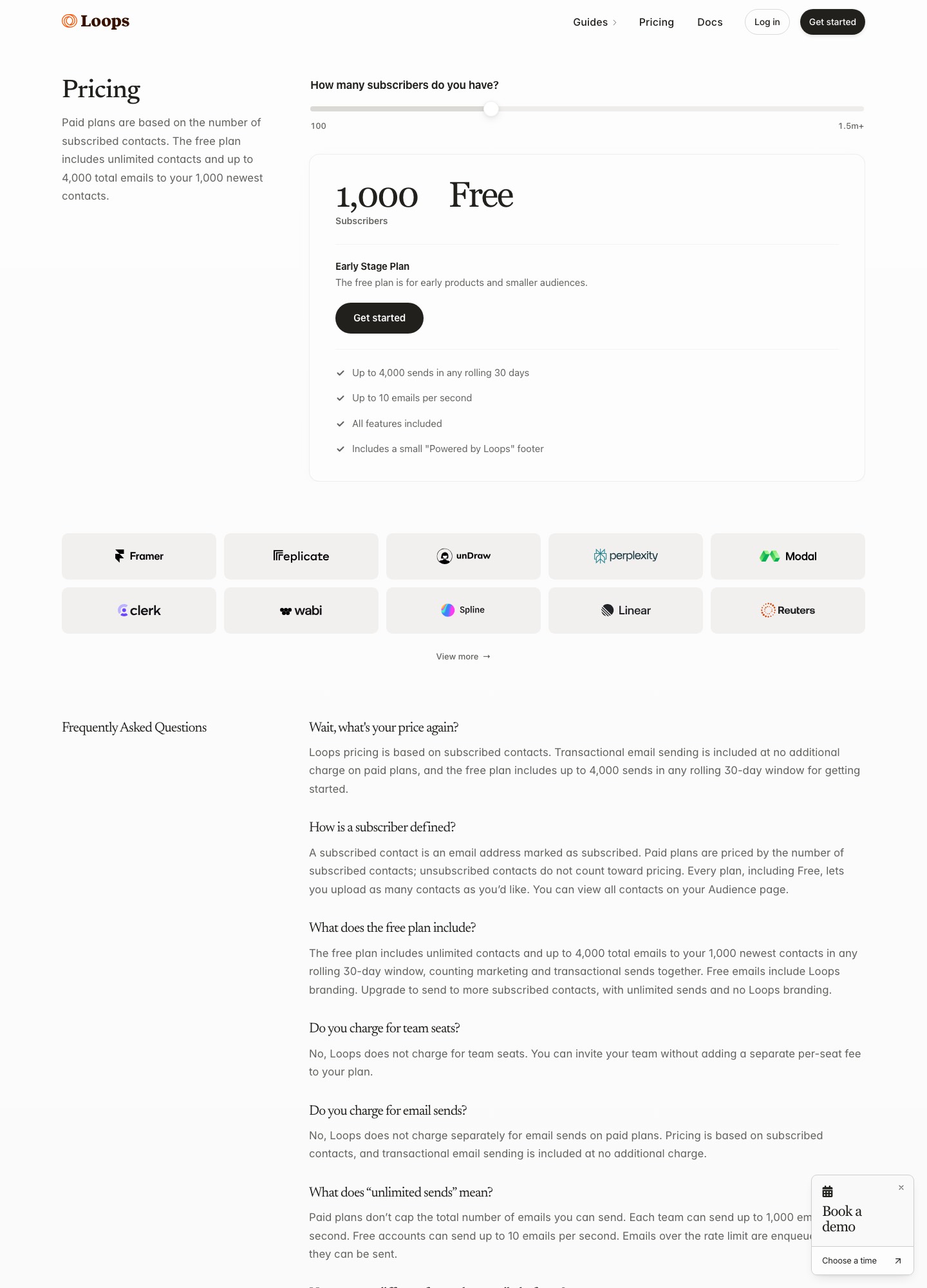
Loops' pricing page says the free plan holds unlimited contacts but sends only to your 1,000 newest, up to 4,000 sends in any rolling 30 days, at 10 emails per second, with a small "Powered by Loops" footer. The FAQ adds that marketing and transactional sends count together. Divide it out: 4,000 sends across 1,000 reachable contacts is four emails each per month, and password resets and receipts eat into the same pool. A product with 300 sign-ups a month, a three-email welcome series (900 sends), a newsletter to 1,000 people (1,000 sends) and 2,000 system emails is already at 3,900.
Paid pricing climbs with subscribers
Paid plans are priced on subscribed contacts. The slider on the pricing page reads $48 a month at 4,788 subscribers, $99 at 9,998, $198 at 24,339, $249 at 49,989 and $799 at 199,878. The per-subscriber rate does fall as you grow, which is the good news. The less welcome part is the first step: the slider goes from free at 1,000 subscribers to $48 at 4,788, so the moment your audience outgrows what the free plan can reach, you start paying.
A contact is a person, and little more
The contact properties page lists the defaults: Email, First Name, Last Name, Notes, Source, Subscribed, User Group and User Id. User Group is a free-text field and a contact can hold only one value. There is no company or account object among the defaults, so a B2B product where five people share a plan ends up copying the plan name onto each person and keeping the copies in sync. If your lifecycle emails depend on what the account did, that is where the friction lives.
Transactional and marketing share one tool and one counter
On paid plans transactional email is included at no added charge and can go to users outside your audience, which is convenient. Unsubscribed contacts keep receiving transactional messages, as the properties documentation notes. Teams whose volume is mostly system mail sometimes decide a send-priced transactional service and a separate marketing tool is the cleaner split.
Who to look at, in one table
| Option | Cost and billing unit | Pick it for | What you accept |
|---|---|---|---|
| Customer.io | Essentials $100 a month at 5,000 profiles, $145 at 10,000; Premium from $1,000 a month; people and objects both count as profiles | Journeys across email, push and in-app, plus objects for accounts | The bill grows with profiles and the event model needs an owner |
| Userlist | Basic $149 and Professional $349 a month, each including 10,000 users; $10 or $12 per extra 1,000 | Companies and users as separate records, with company-level segments and workflows | The entry price on the page is $149 for up to 10,000 users |
| Encharge | Growth $99 and Premium $159 a month for up to 2,000 subscribers | Marketers who build flows themselves and need HubSpot or Salesforce sync on Premium | Transactional email only on Premium |
| Bento | $29 a month for up to 5,000 active users, then from $0.01 per active user | A low entry price with unlimited marketing sends and no seat fees | Per-user rate past 5,000 is the only figure published |
| Brevo | Free at 300 emails a day; Starter from $9 and Standard from $18 a month; Professional from $499 | A free plan with a daily limit instead of a 1,000-contact limit | Priced on volume of email, so frequent mailing costs more |
| Resend | Free at 3,000 emails a month (100 a day); Pro $20 for 50,000; Scale $90 for 100,000 | Product and transactional email sent through an API | Per-email pricing, not a marketing platform with segments |
What the same list costs elsewhere
Loops counts subscribed contacts, and unsubscribed contacts are not billed, according to its FAQ. Others count profiles, users or emails, so the comparison below names the unit each time.
- 1,000 contacts. Loops: free, within the 4,000-send limit. Customer.io: $100 a month, the Essentials entry with 5,000 profiles. Encharge: $99 on Growth, which includes up to 2,000 subscribers. Userlist: $149 on Basic, which includes 10,000 users. Bento: $29. Brevo: free, if 300 emails a day suit you; that is about 9,000 in a 30-day month.
- 10,000 contacts. Loops: $99 at 9,998 subscribers. Customer.io: $145 at 10,000 profiles. Userlist: $149 Basic, $349 Professional. Encharge: $249 Growth, $399 Premium. Bento: $29 covers 5,000 active users; the 10,000 total is not published beyond the $0.01 rate.
- 50,000 contacts. Loops: $249 at 49,989 subscribers. Customer.io: $505+ at the 50k+ step, where the page also suggests Premium. Userlist Basic: $149 plus 40 extra thousands at $10, which is $549 by the page's rate; Professional $349 plus 40 at $12, which is $829. Encharge's page reads up to 25,000 subscribers ($389 Growth, $649 Premium), so a 50,000 figure is not shown.
On the published figures Loops comes in below Customer.io, Userlist and Encharge at 10,000 contacts, and below Customer.io and Userlist at 50,000, where it costs less than half of Userlist Basic. For email-priced vendors the arithmetic is sends, not contacts: a 10,000-person list mailed twice a month is 20,000 emails, which sits within Resend's 50,000-email Pro plan at $20 a month, though that comparison only helps if you do not need segments and workflows.
Each alternative, and the case against it
Customer.io for cross-channel journeys
Customer.io lists a visual workflow builder, email, push, in-app messaging and WhatsApp, with 2 object types on Essentials and 10 on Premium. Objects are how you model an account next to its people, which answers Loops' data-model gap directly. The cost is the meter: people and objects both count as profiles. Our Customer.io alternatives page goes through its billing rules in detail. Pick it when journeys across channels matter more than a small bill.
Userlist when the account is the customer
Userlist's pricing page includes company-account features, segments for users and companies, in-app messages and a visual workflow builder in Basic, and adds A/B testing, conversion goals and advanced workflow features in Professional. Billing is by tracked users, counting every user stored, active or not, per its FAQ. For a team plan product, being able to trigger a message when a company, not one person, does something is the point. Our Userlist alternatives page covers leaving it.
Encharge for marketers who build their own flows
Encharge lists a visual flow builder, behavior-based emails, advanced segmentation, webhooks and unlimited flows and team members on Growth. Premium at $159 a month adds HubSpot and Salesforce and transactional email, and extra email beyond the plan is $100 per 100,000. It gives you more room in the flow than Loops does, at a higher price per subscriber at every size shown above.
Bento and Brevo for a cheaper floor
Bento charges $29 a month for up to 5,000 active users, defines active as subscribed or with an event in the last 30 days, and has no seat fees. Brevo's free plan allows 300 emails a day and, according to its help center, storage for up to 100,000 contacts, which sidesteps Loops' 1,000-contact reach limit; the catch is that the free plan lists 2,000 contacts in marketing automation. Standard at $18 a month adds automation, A/B testing and advanced reports. Both are general-purpose, so test that your lifecycle triggers fit before moving.
Resend for the transactional half
Resend prices per email: Free is 3,000 a month with a 100-a-day cap and 3 domains, Pro is $20 a month for 50,000 emails and $35 at 100,000 on the pricing page slider (read 7 Oct 2026), and Scale is $90 at 100,000 and $160 at 200,000. If most of what Loops sends for you is receipts, invites and resets, moving that stream there and keeping marketing elsewhere is a legitimate split.
Reasons to stay on Loops
Stay if your audience is individuals and your lifecycle logic is about one person at a time. The paid plan includes all features at one price, with no seat fee and no separate charge for sends, so there is no ladder to climb for A/B tests or more users. Stay if you are under about 10,000 subscribers: the $48 step at 4,788 subscribers and the $99 step at 9,998 are low next to the $100 and $149 entry prices of Customer.io and Userlist. And stay if the issue is only the free plan's cap, because the next Loops step costs less than the entry prices of Customer.io, Userlist and Encharge.
Getting your contacts out of Loops
Loops' export documentation says you can download a CSV of your audience at any time, whole or filtered. You open the ••• menu in the filter box and choose Download. The file has a column for each default property and each custom property you have added. Filters can pick contacts who opened a campaign, were not sent one, clicked a workflow link, subscribed after a date or share an email domain, and you can save a filter as a segment for reuse.
Keep the Subscribed column when you import elsewhere, because Loops' properties page says unsubscribed contacts are not billed and recommends keeping them in the audience. Dropping them from the export and re-adding them later could mail people who opted out. The export page covers contact data only; we found no description there of exporting workflows or campaigns, so rebuild those by hand in the new tool. If you move into Customer.io or Userlist, rely on their own import docs for column mapping, and map User Id carefully because it is how Loops matches contacts on update.
FAQ
What happens to my Loops contacts above the 1,000 limit on the free plan?
They stay in your audience. The pricing page says the free plan has unlimited contacts but sends only go to your 1,000 newest, and no more than 4,000 sends in a rolling 30 days. Upgrading removes that reach limit and moves billing to subscribed contacts.
Does Loops charge for unsubscribed contacts?
No. The pricing FAQ defines a subscribed contact as an address marked as subscribed and says unsubscribed ones do not count toward pricing. That makes cleaning the list less urgent than on tools that bill every stored record.
Can Loops send Stripe failed-payment emails?
Yes, according to its Stripe integration page, which lists invoice.payment_failed, invoice.upcoming and customer.subscription.deleted among the events it accepts to trigger workflows. If you leave Loops, confirm your next tool supports the same events before you cancel.
Is there a Loops alternative with company-level data?
Userlist, which models companies, users and the relationship between them, and Customer.io, which uses objects for the same purpose. Both cost more than Loops at 10,000 contacts: $149 for Userlist Basic and $145 for Customer.io Essentials, against $99.
Which alternative is closest to the Loops free plan?
Brevo is nearest in shape: its free plan allows 300 emails a day instead of capping reach at 1,000 contacts, with automation limited to 2,000 contacts. Resend's free plan is counted per email, 3,000 a month, and suits product mail better than newsletters.
Related: all alternatives, email automation tools, onboarding automation tools, automation for founders, automation integrations.