By Rowan Ellis · Updated October 7, 2026
Customer.io alternatives for SaaS teams
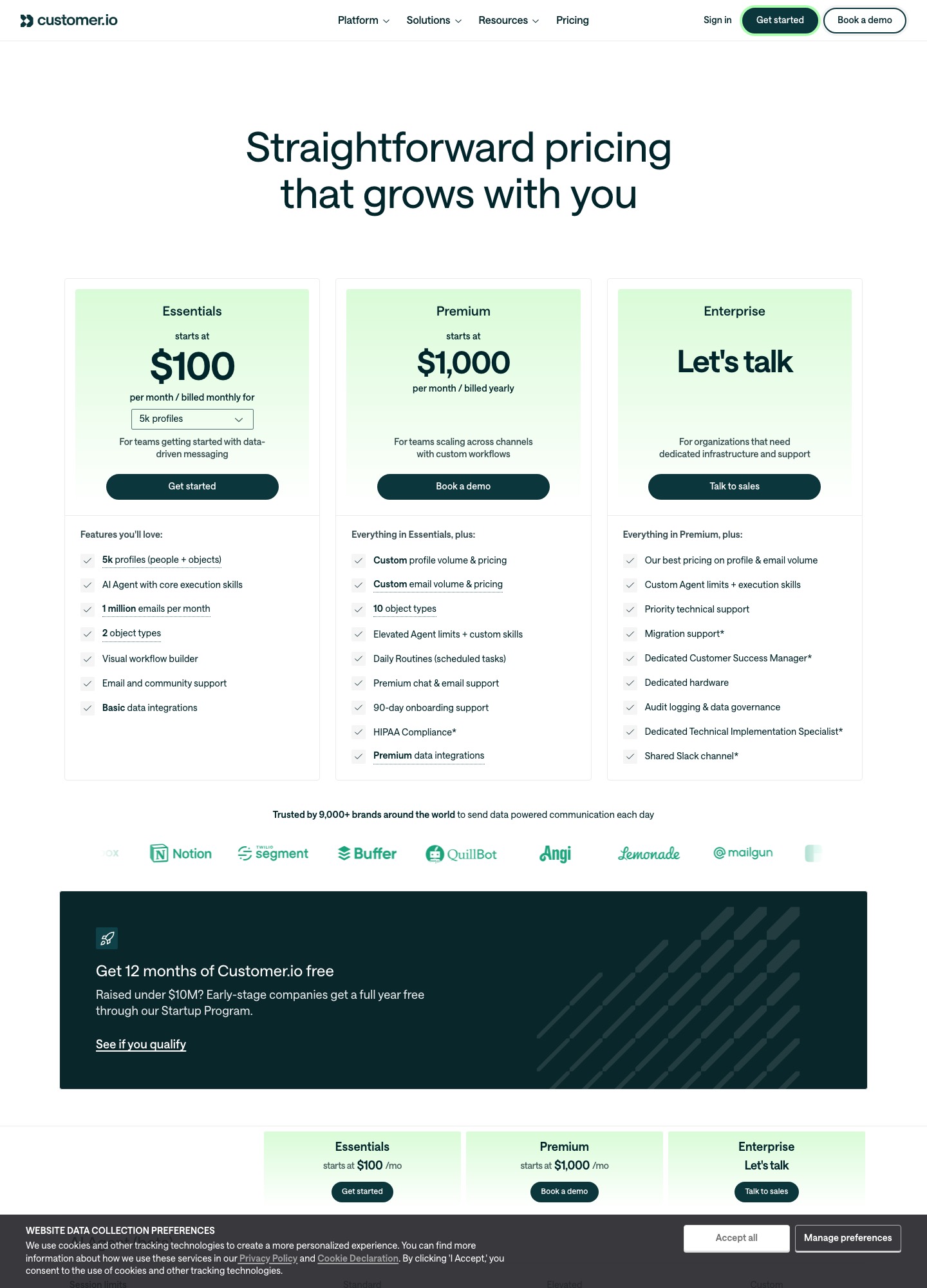
The strongest Customer.io alternatives for a SaaS team are Loops for plain product email at a lower price per subscriber, Userlist if you need to message companies and not only individual users, Encharge for behavior-based flows, and Bento for a small active-user bill. People usually leave because the Customer.io pricing page ties Essentials to profiles: $145 a month at 10,000 profiles, $235 at 20,000, and $1,000 a month for Premium. Every price here was read on October 7, 2026.
Not everyone should go. Customer.io is a capable messaging platform, and some of what it costs buys things the cheaper tools do not have. The sections below show what pushes a bill up, what each alternative costs at 5,000, 10,000 and 25,000 contacts, and what Customer.io lets you carry out the door when you leave.
What pushes teams off Customer.io
The meter counts profiles, and objects are profiles too
Essentials starts at $100 a month for 5,000 profiles, and the pricing page spells out that a profile can be a person or an object. Past the included amount, the billing documentation lists $0.009 per extra profile on Essentials, which is $9 per 1,000. The same page describes high-watermark billing: a profile that existed at any point in the billing period counts, even if you deleted it, and a profile you delete and re-add in the same period counts twice. Profiles in test, dev or sandbox workspaces count toward the total as well. A team that runs a staging workspace with a copy of production data pays for that copy.
The next plan up is a different price class
Premium starts at $1,000 a month billed yearly. The comparison table on the pricing page marks custom role-based permissions, managed deliverability and anonymous messages as not included on Essentials, and the Essentials card allows 2 object types where Premium allows 10. At the 50,000-profile step the selector reads $505+ and adds a note suggesting Premium for a similar price. A team that needs just one gated feature faces a choice between living without it and paying roughly double.
Support is email and community until you pay for more
Essentials lists email and community support. Premium adds chat and email support plus 90 days of onboarding help, and the Enterprise column adds priority technical support, a dedicated customer success manager and a shared Slack channel. For a three-person product team that gap matters most in the first month, while the data model is being wired up and every question is new.
Somebody has to own the event dictionary
Customer.io's documentation on custom events tells you to send all the data you think might be useful, as nested JSON with arrays and objects, because you cannot send out of the system what you never sent in. That flexibility is the reason people choose it, and also the build cost: event names, property shapes and identity rules need an owner, or the workspace fills with events nobody dares to delete. Tools with a narrower model ask for less up front.
Six alternatives and the reason to pick each
| Alternative | What it costs, and the unit | Who it fits | The real trade-off |
|---|---|---|---|
| Loops | Free plan; $99 a month at 9,998 subscribers, $249 at 49,989. Priced on subscribed contacts, no charge for sends on paid plans | Small SaaS teams that want product email, campaigns and transactional email in one place | Contacts are people; the default properties are person-level, with a single User Group value |
| Userlist | Basic $149 a month and Professional $349 at up to 10,000 users, then $10 or $12 per extra 1,000 users | B2B products where several people share one account | Both plans include 10,000 users, so a small list pays for headroom it does not use |
| Encharge | Growth $99 a month and Premium $159 for up to 2,000 subscribers; $249 and $399 at 10,000 | Teams that want a visual flow builder with behavior triggers | Transactional email only on Premium; the subscriber ladder is steep |
| Bento | $29 a month for up to 5,000 active users, then from $0.01 per active user; transactional from $5 a month | Lean teams that want a low entry price and unlimited marketing sends | Beyond 5,000 active users the page gives only a per-user rate, so budget by asking for a quote |
| ActiveCampaign | Starter from $15 a month at 1,000 contacts, billed annually; Pro $79 | Teams that also want a CRM next to email automation | Contact-based like Customer.io, and Starter allows 5 actions per automation |
| Brevo | Free at 300 emails a day; Starter $9 and Standard $18 a month from 5,000 emails; Professional $499 | Teams with a large list and modest sending | Priced on email volume, so a list mailed daily costs more than one mailed monthly |
Cost at 5,000, 10,000 and 25,000 contacts
Vendors count different things, so the unit is part of each figure. Customer.io counts profiles; Loops counts subscribed contacts; Userlist counts every tracked user; Encharge counts subscribers; Bento counts active users. Where a vendor does not publish a price at a volume, it is marked and not estimated.
- 5,000 contacts. Customer.io Essentials: $100 a month. Loops: $48 at 4,788 subscribers, the nearest step on its slider. Encharge: $179 on Growth, $269 on Premium. Bento: $29 a month for up to 5,000 active users. Userlist: Basic includes 10,000 users, so $149 is the entry price even for a smaller list.
- 10,000 contacts. Customer.io: $145. Loops: $99 at 9,998 subscribers. Userlist: $149 on Basic, $349 on Professional. Encharge: $249 on Growth, $399 on Premium. Bento: $29 covers the first 5,000 active users, and the page gives only a "from $0.01 per active user" rate beyond that, so the 10,000 total is not published.
- 25,000 contacts. Customer.io's selector steps from $235 at 20,000 profiles to $325 at 30,000, with no 25,000 stop, so expect a figure between the two. Loops: $198 at 24,339 subscribers. Encharge: $389 on Growth, $649 on Premium. Userlist Basic: $149 plus 15 extra thousands at $10 each, so $299 by the page's own rate.
Read together, the gap is largest on the Premium tiers of Encharge and Userlist, which are priced like Customer.io's upper end, and smallest where the alternative is a flat per-subscriber ladder like Loops. At 10,000 profiles the difference between Customer.io and Loops is $46 a month, which is $552 a year. Whether that justifies a migration depends on how many journeys you would have to rebuild.
What each one does better, and what you give up
Loops: the plain-spoken option
Loops charges by subscribed contacts, includes team members at no extra fee, and does not bill separately for sends on paid plans. Its free plan keeps all features but limits sending to your 1,000 newest contacts, up to 4,000 sends in any rolling 30 days. Its Stripe integration accepts events such as invoice.payment_failed and customer.subscription.deleted, so billing emails are covered. What you give up: the contact record is a person with a few default fields, and there is no company object among the defaults on its contact-properties page. Choose it if your messages go to individuals.
Userlist: the one that models companies
Userlist's company accounts let you send properties and events at company, relationship and user level, with segments for companies as well as users. If your product is sold to teams, that removes the workaround of copying a plan field onto every member. The cost is the floor: its pricing page includes 10,000 users in the $149 Basic plan, so a list of 3,000 pays for headroom it does not use. Choose it when account-level triggers matter and your list is large enough to fill the first tier.
Encharge: flows with a heavier ladder
Encharge advertises a visual flow builder, behavior-based emails, webhooks and unlimited flows and team members on Growth ($99 a month for up to 2,000 subscribers, $79 billed yearly). Premium at $159 adds HubSpot and Salesforce integrations and transactional email. Email beyond the plan limit is $100 per 100,000 emails. It suits a marketer who builds flows without engineering help; the price at 25,000 subscribers is $389 on Growth, which is not cheap.
Bento: pay for the people who are active
Bento counts an active user as someone subscribed or someone with an event in the last 30 days, per its pricing FAQ, so people who unsubscribed and have done nothing recently fall outside the count. Marketing sends are unlimited on paid plans and there are no seat fees. Transactional email is a separate meter, with 100 emails free and paid usage from $5 a month. Choose it if you want an entry price of $29 and no per-send charge. Past 5,000 active users its page gives only a per-user rate of $0.01 and up, so ask what your list size costs, and test whether its automations cover your lifecycle map before you commit.
ActiveCampaign and Brevo: wide tools, different meters
ActiveCampaign lists Starter $15, Plus $49, Pro $79 and Enterprise $145 a month at 1,000 contacts, billed annually, and pairs automation with a CRM and a deals pipeline. Starter limits automations to 5 actions and one user, and Pro carries advanced segmentation and 3 users. Brevo prices by monthly email volume; its free plan is 300 sends a day, and automation and A/B testing arrive on Standard at $18 a month. Neither was designed around product events the way Customer.io was, so check that your trigger list fits before moving.
Pricing by email volume instead of profiles
If you run a SaaS billed through Stripe, Sequenzy is priced on monthly email volume instead of profiles: its pricing page lists a free plan with 2,500 emails a month, then $19 a month for 15,000 emails, $29 for 30,000, $49 for 60,000 and $99 for 120,000, with unlimited contacts. Its site says a Stripe invoice.payment_failed event starts a dunning email flow with a card-update page, while payment retry logic stays in Stripe or Paddle.
When staying on Customer.io is the better call
Stay if your messaging crosses channels. The pricing page lists email, push, in-app messaging, SMS and WhatsApp, with unlimited push and in-app volume, while most of the alternatives here concentrate on email. Stay if you have raised under $10M: the Startup Program gives early-stage companies 12 months free, which can make the first year cheaper than any switch. Stay if your workflows are deeply branched and have been tuned for years, because rebuilding them by hand costs engineering and marketing time that a $46 monthly difference at 10,000 profiles will not repay quickly. And if you have outgrown nothing, with a few thousand profiles and a handful of journeys, the plain answer is that Essentials at $100 a month is a reasonable price for what it does.
Taking your data out of Customer.io
The export documentation for multiple people describes a CSV export from the People page with four options: all attributes, displayed attributes, chosen attributes, or an "Export other" route for duplicates and devices. The id attribute is always included, and you can export only people who match a segment or attribute filter. Relationships to objects come out as a separate CSV, identified by cio_id, and an export above 2 million relationships fails. The page warns that exports include all attribute data for the selected people.
Two caveats from the same page. The GDPR suppression list exports with hashed values (cio_id, id_sha256, email_sha256), and because the hashing is one-way, the file lets you check whether an address is suppressed but not recover the addresses, so keep your own record of who must never be mailed. For history, the data warehouse integration writes Parquet files for deliveries, metrics, people and attributes to an S3 or Google Cloud bucket about every 15 minutes, and the page says it cannot export events older than 30 days. The pages we read describe exports of people, relationships, suppressions and warehouse files; none of them describes carrying journeys to another vendor, so plan to rebuild automations by hand and to carry the email copy across yourself.
On the receiving side, Loops' CSV upload recommends Email, First Name, Last Name, User Group and Source columns, maps extra columns to custom properties, and marks every uploaded contact as subscribed unless the file has a Subscribed column set to false. Import your unsubscribes with that column, or you will re-subscribe people who left.
FAQ
Does Customer.io have a free plan?
Not on the pricing page. Essentials starts at $100 a month for 5,000 profiles, billed monthly. The route to free is the Startup Program, which gives companies that have raised under $10M a full year at no charge, so check eligibility on the startup page before you start comparing prices.
Why can my Customer.io bill be higher than my current profile count?
Billing uses a high watermark, so profiles you deleted during the period still count, and a deleted-then-re-added profile counts twice. Profiles in test or sandbox workspaces also count. The billing page shows current and billable profile counts in the Account Summary; compare the two.
Which alternative handles failed-payment emails from Stripe?
Loops' documentation lists invoice.payment_failed among the Stripe events it accepts, and Bento's pricing page names Stripe among its integrations. Both can trigger a message from a billing event. Decide which side owns the retry schedule, because that logic usually sits in your billing system, not in the email tool.
Can I move my Customer.io journeys to another tool?
The export pages we read cover people, relationships, suppressions and warehouse files, not journey definitions. Treat each journey as a rebuild: write down the trigger, the wait steps, the conditions and the message for each one, then recreate them in the new tool.
Is Customer.io cheaper than Loops at 50,000 contacts?
The two count different things: Customer.io's selector reads $505+ at 50k+ profiles, which includes objects, while Loops' slider reads $249 at 49,989 subscribed contacts. On those readings Loops is cheaper, but compare the number of people you would message with the number of profiles you hold today, because the two counts rarely match.
Related: all alternatives, Customer.io vs Braze, onboarding automation tools, billing automation tools, automation for startups, and the Loops and Userlist alternatives pages.