By Rowan Ellis · Updated October 7, 2026
Drip alternatives for SaaS and subscription teams
The Drip alternatives most worth a trial for a SaaS team are Customer.io, Loops, Userlist and MailerLite, with ActiveCampaign and Brevo as the picks if you want broader marketing tooling. People tend to leave Drip for three reasons: the bill jumps at every band of active people and follows your monthly peak rather than today's count, the product leans toward orders and carts instead of accounts, trials and plan changes, and there is no free plan to park a small product on. Prices below were read from each vendor's pricing page on October 7, 2026.
Drip's own pricing page is open about its audience: it advertises one-click integrations with Shopify, WooCommerce and BigCommerce and revenue traced back to orders. A subscription product can still run there, since Stripe is on the integration list and Drip's help center says it records events for people, but you will be bending store-shaped tooling around product data. What follows is what you would pay at 5,000, 10,000 and 25,000 people elsewhere, where each option is weaker than Drip, and what actually leaves with you when you export.
What pushes SaaS teams off Drip
The price moves in bands. Drip's pricing page uses a list-size slider: $39 a month covers 1 to 2,500 people, $49 covers 2,501 to 3,000, $89 covers 4,501 to 5,000 and $154 covers 9,001 to 10,000. It keeps climbing to $369 at 25,000 and $699 at 50,000. Lower bands list unlimited sends, but the 40,000 band shows 480,000 sends and the 50,000 band 600,000, and Drip's billing article says high-volume plans carry a monthly send limit that triggers an automatic upgrade.
You pay for your peak. The same billing article describes a "high watermark" system: the plan is set by the highest number of active people and sends reached in the previous month, and the invoice is for the coming month. Deleting people or moving them to Inactive part-way through a cycle does not lower that cycle's bill; the downgrade shows up the following month. A list sitting at 2,400 that touches 2,600 for one day is billed at the $49 band for that cycle. The trial works the same way, because the plan you land on after 14 days is based on the most active people you had during the trial.
Opted-out users still count. Drip's Active People article defines active people as everyone you can engage with and are billed for, and its list of unsubscribed people sits inside that group because they can still get transactional email and trigger workflows. For a SaaS that keeps churned customers around for receipts and win-back, the billable list is bigger than the marketing list.
The starter playbooks are for shops. Drip's migration guide points to ready-made workflows for Welcome Series, Abandoned Cart, Post First Purchase, Post-Repeat Purchase and Win Back Previous Purchasers. Trial-ending nudges, seat invitations or upgrade prompts are yours to build from a blank workflow, which is perfectly possible, but the head start is aimed at a different business.
No ongoing free plan. The pricing page offers a 14-day trial with no credit card, then $39 a month at the smallest band. A pre-launch product with a few hundred sign-ups pays the same as one with 2,500, whereas Loops, MailerLite and Brevo each publish a free plan.
Drip's pricing page as it stood in October 2026
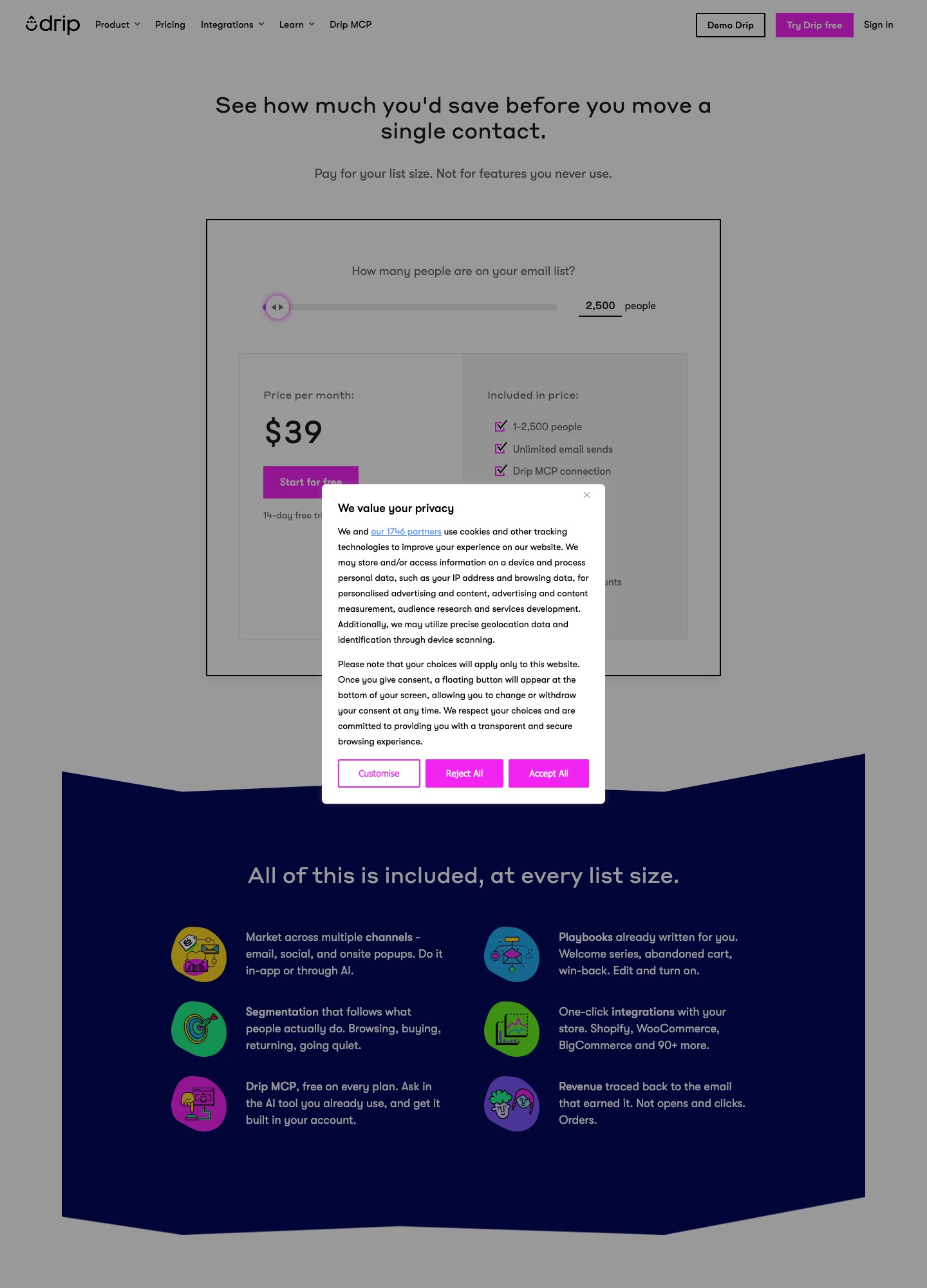
The capture shows the slider at 2,500 people and $39, the "pay for your list size" headline and the 14-day trial note. Everything else on this page about Drip's rates comes from the slider readouts at other list sizes on the same URL.
Six alternatives side by side
| Alternative | What it bills on, and from what price | Fits best | The real catch |
|---|---|---|---|
| Customer.io | Profiles (people plus objects). Essentials $100/mo billed monthly for 5k profiles, $145 at 10k, $235 at 20k. Premium from $1,000/mo billed yearly. | Teams whose emails are triggered by product events and who want a visual workflow builder across email, push and in-app. | The lowest readout is $100, so a 2,000-person list pays more than at Drip. Objects count as profiles. |
| Loops | Subscribed contacts. Free plan; paid Growing Audience $99/mo at 9,998 subscribers, $249 at 49,989. | Small and mid-size SaaS audiences that want one flat price with all features and transactional sends included. | The free plan caps sends at 4,000 per rolling 30 days to your 1,000 newest contacts and adds a footer. |
| Userlist | Users. Basic $149/mo for up to 10,000 users, then $10 per extra 1,000. Professional $349 then $12 per extra 1,000. | B2B products that segment by user and by company. | Packages start at 10,000 included users, so a small list overpays. |
| MailerLite | Subscribers. Free to 250; Comfort $12/mo and Power $25/mo at 500 ($10.80 and $22.50 billed annually). | Newsletter-heavy products and budget-led teams. | Transactional email comes from MailerSend, a separate product. |
| ActiveCampaign | Contacts. Starter $15, Plus $49, Pro $79, Enterprise $145 per month at 1,000 contacts, billed annually. | Teams that want CRM and deeper automation in one place. | Starter allows 1 user and 5 actions per automation; SMS and transactional email are add-ons. |
| Brevo | Monthly email volume. Free $0 (300 sends a day); Starter $9 and Standard $18 from 5,000 emails; Professional $499. | Large user bases that email rarely, and anyone who needs email and SMS from one vendor. | A/B testing and advanced reports start on Standard, and price follows sends, so frequent mailing gets costly. |
What 5,000, 10,000 and 25,000 people cost
Monthly prices from the same pricing pages, no discounts assumed. Where a vendor shows no reading at a size, the line says so rather than guessing.
- 5,000 people: Drip $89. Customer.io Essentials $100 (5k profiles). MailerLite Comfort $49 or Power $69 at up to 5,000 subscribers. Userlist's packages begin at 10,000 included users ($149 on Basic), and Loops shows readings at about 10,000 and 50,000 subscribers but not here.
- 10,000 people: Drip $154. Customer.io $145. Userlist Basic $149 (Professional $349). MailerLite Comfort $89 or Power $129. Loops $99 at 9,998 subscribers. Against Loops, Drip costs $55 more per month, which is $660 over a year.
- 25,000 people: Drip $369. MailerLite Comfort $179 or Power $239. Userlist Basic works out to $149 for the first 10,000 plus 15 extra thousands at $10, so $149 + $150 = $299; Professional is $349 + (15 x $12) = $529. Customer.io shows $235 at 20k and $325 at 30k but no 25k reading, and Loops' slider reads $198 at 24,339 subscribers. The Drip-to-MailerLite Comfort gap of $190 a month is $2,280 a year.
At 50,000 the gap widens: Drip lists $699, Customer.io $505 or more, Loops $249 and Userlist Basic $149 + (40 x $10) = $549. ActiveCampaign and Brevo are left out of the volume lines because their pages show starting prices only (contacts for ActiveCampaign, monthly emails for Brevo), so a fair figure needs your own selector entry. Cheaper does not mean equal: the cheapest rows here are the ones that change your data model the most.
Who to move to, and what you give up
Customer.io for event-driven journeys
Customer.io's page leads with a visual workflow builder, email, push, in-app messaging and WhatsApp, and Essentials includes 1 million emails a month; extra profiles are $0.009 each and extra thousands of emails $0.12. That is a better fit than Drip when messages hang off what people do inside the product. You give up Drip's flat-band simplicity and its low entry price: $100 is the lowest figure on the page. Early-stage companies that raised under $10M can claim a year free through its startup program, which changes the first-year maths for a seed-stage team. For the head-to-head, see Customer.io vs Braze.
Loops when the audience is modest
Loops charges no seat fees and no separate charge for sends on paid plans, and transactional sends to users outside your audience are part of the Growing Audience plan. At 9,998 subscribers the page reads $99, against Drip's $154. The slider is the only place to read your own size, since the page gives no table: it reads $48 at 4,788 subscribers and $198 at 24,339, so check your list size there before you budget. The free plan suits a prototype, though the 4,000-send cap and the "Powered by Loops" footer will not suit a launched product.
Userlist for user-and-company segmentation
Userlist's plans list marketing and lifecycle email, in-app messages and segments for users and companies, with A/B split testing, conversion goals and advanced workflows on Professional. The $10 or $12 per extra 1,000 users is a steady slope rather than Drip's bands, which makes budgeting simpler. You pay for that with a high floor ($149 for the first 10,000), and the page shows no cheaper rung for a small list.
MailerLite when cost leads
MailerLite is the cheapest route on the pricing pages above: $89 for 10,000 subscribers on Comfort, $129 on Power, which also lifts the monthly email cap. Its free plan covers 250 subscribers, 2,500 emails and 2 seats. What it advertises is email automation, landing pages, digital products and an AI writing assistant, so if your triggers come from in-app events, check in a trial how that data reaches it. Transactional sending is handled by MailerSend.
ActiveCampaign for CRM-style automation
ActiveCampaign adds a standard CRM and tiered segmentation, from standard on Plus to premium on Enterprise, with 3 users on Pro and 5 on Enterprise. All four plans are quoted billed annually, so the headline figures assume a yearly commitment. Starter's 5 actions per automation is tight for a lifecycle flow. If sales follows up on product-qualified leads it can replace two tools; if not, the extra surface is overhead. Our Mailchimp vs ActiveCampaign page covers its plan ladder.
Brevo when send volume is low
Brevo's free plan allows 300 sends a day and storage for up to 100,000 contacts, though automation is capped at 2,000 contacts there. Starter at $9 and Standard at $18 both begin at 5,000 emails a month. A large, quiet user base is cheap to hold on Brevo; a team mailing everyone weekly will climb its volume tiers quickly. It also lists transactional email, SMS and WhatsApp campaigns.
When staying on Drip is the better call
Stay if you also sell physical or digital goods through Shopify, WooCommerce or BigCommerce and want orders and revenue attribution in the same place, if your list is under 2,500 so the $39 band holds, or if your active-people count barely moves from month to month so the peak rule never bites. Paying $39 for a stable list is hard to beat against a $100 starting point at Customer.io or $149 at Userlist.
Leaving Drip: what exports and what you rebuild
Drip's Export Data article says every export is a CSV, delivered as an emailed link to the address under Settings, User Settings. Go to People, then Active, filter if you need a slice (or leave it blank for everyone), then Actions, Export to CSV. The columns are email, Drip id, status (active or unsubscribed), created_at, confirmed_at, tags, email series campaign names, referrer, landing_url, ip_address, lead_score, lifetime_value, user_id and custom fields. Carry the status column over so unsubscribes land in your new tool's suppression list, and use user_id to match rows to your own accounts.
- Settings, Account, Export Account bundles templates, the people list and email series campaigns. The same article states that emails built in the visual email builder and events are not exportable, so save any message HTML you want before you cancel.
- Workflows are not among the items the Export Account section lists. Plan to rebuild them by hand; Drip's own migration guide tells people arriving at Drip to recreate their automations from scratch with the old ones open in another window, and your move away will go the same way.
- The Analytics tab can export New People, Unsubscribes, Email Metrics, Clicks and Events reports to CSV. A bulk download of email metrics leaves out email addresses. Open an Events report before you rely on it for history, since the account export excludes events.
- Time the cutover to your billing day. Drip invoices the next month on the previous month's peak, so removing people on the day you leave still leaves that cycle's bill unchanged.
FAQ
What is the cheapest Drip alternative at 10,000 users?
On the pricing pages we read, MailerLite Comfort is $89 a month for 10,000 subscribers and Loops shows $99 at 9,998, against $154 on Drip. Customer.io ($145) and Userlist Basic ($149) land close to Drip's price, so move to them for the data model, not the saving.
Does Drip charge for unsubscribed contacts?
Yes, if they are still active in the account. Drip's Active People article describes unsubscribed people as a subset of active people, who remain billable. Moving people to Inactive stops billing for the following cycle, but also stops events, orders and automations for them.
Why did my Drip bill not drop after I deleted people?
Drip bills on a high-watermark basis: the plan is based on the previous month's highest number of active people and sends. Deleting people mid-cycle only lowers the bill from the next cycle, as its billing article explains.
Can I export my Drip workflows to another tool?
The pages we read do not list workflows as an export item. They cover people, templates and email series campaigns in the account export, and exclude visual-builder emails and events, so treat workflows as something you rebuild in the new tool.
Does Drip have a free plan, and which alternatives do?
Drip offers a 14-day free trial with no credit card and no ongoing free plan. Loops (4,000 sends per rolling 30 days), MailerLite (250 subscribers, 2,500 emails) and Brevo (300 sends a day) each publish a free plan, and Customer.io's startup program gives eligible early-stage companies a year free.
All alternatives · Klaviyo alternatives · Customer.io vs Braze · Email automation tools · Onboarding automation · Automation for startups